Subscription Box
The Subscription Box is the public signup form your visitors see on the website. Every active source gets its own box, so each form on your site tags its signups with the right source and sender identity automatically.
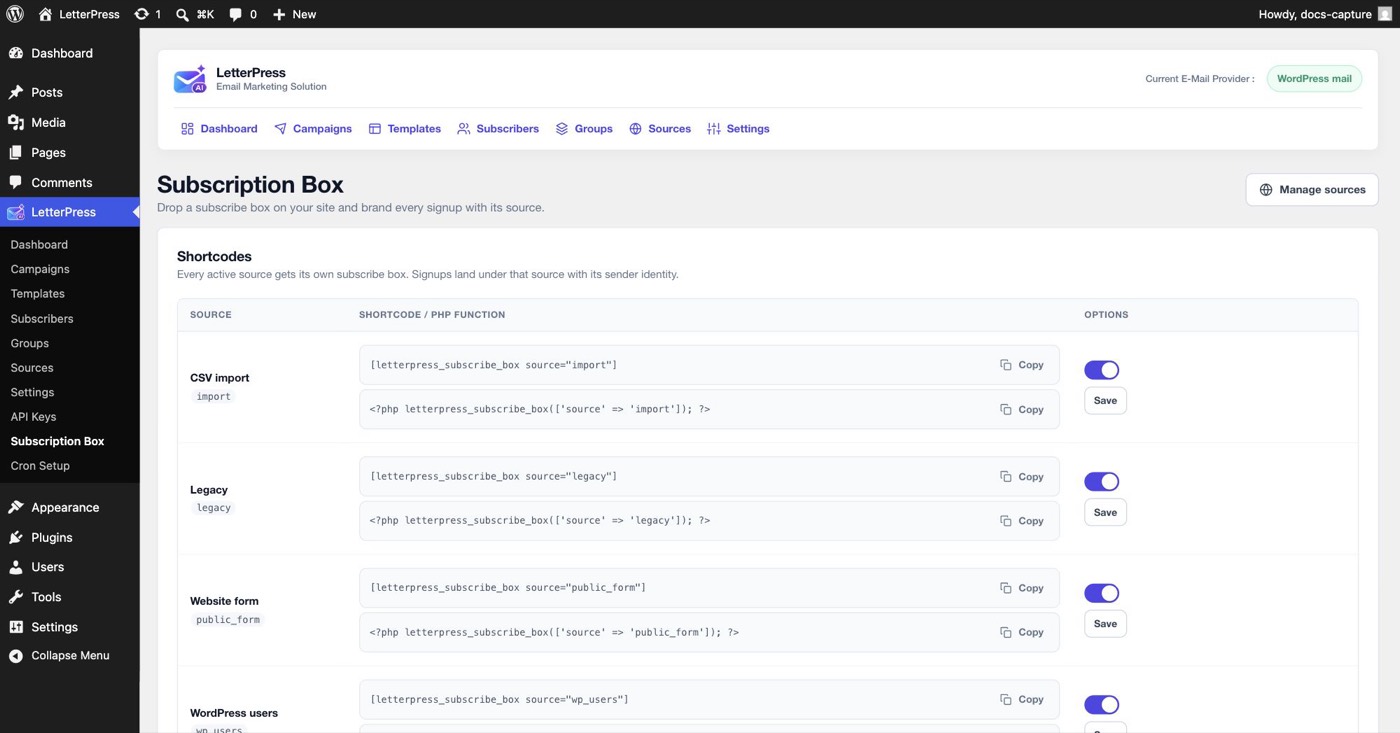
Open LetterPress > Subscription Box.
Placing a form
For each active source the page shows a shortcode and a PHP function, both with a copy button:
[letterpress_subscribe_box source="default"]
<?php letterpress_subscribe_box( [ 'source' => 'default' ] ); ?>
- Use the shortcode in any post, page, or widget.
- Use the PHP function directly in a theme template.
Paste the shortcode for the source you want, then publish the page. Signups through that form appear in Subscribers under that source. To stop accepting signups for a source, deactivate it under Sources. Its shortcode then falls back to the default source instead of creating signups under an inactive source.
Per-source name field
Each row has a Show name field toggle and a Save button. The name field is on by default. Turn it off when you only want an email address, for example on a compact footer form.
The toggle is stored per source. Hiding the name field does not change how existing subscribers are stored, and new signups simply have an empty name.
How public signups are confirmed
Behavior comes from Settings > Deliverability:
- Double opt-in keeps new signups in Pending until they click the confirmation link in their inbox. Imported and synced subscribers are treated as pre-consented and skip this step.
The Settings > General tab controls whether LetterPress loads the subscribe box stylesheet. Turn it off if your theme already styles the form, which saves a request and keeps your theme in control of the look. Pending signups appear in the Pending filter of the Subscribers list.
Spam protection
The built-in form includes four layers of protection. You do not need to configure them.
Math captcha
The form shows a simple addition question, for example 4 + 7. The answer is generated server-side and never sent to the browser. Each challenge can be used once and expires after 15 minutes. A wrong or expired answer returns a friendly message and issues a fresh question.
Honeypot field
A hidden website field sits in the form and is invisible to real visitors. Bots that fill every field trip it. LetterPress silently accepts the submission and does not create a subscriber, so the bot gets no signal that it was caught.
Consent checkbox
The visitor must tick a consent checkbox before the form will submit. The label names your site and explains that they can unsubscribe at any time. Submissions without consent are rejected.
Per-IP rate limits
Public signups are limited to 5 per hour from one IP address. Captcha refresh requests are limited separately to 60 per hour. This stops scripted floods without getting in the way of normal visitors.
AJAX and non-JS forms
The standard subscribe box submits with AJAX. The visitor stays on the page, the status message appears below the button, and the captcha refreshes automatically after an error.
If you need a form that works without JavaScript, use the non-JavaScript shortcode:
[letterpress_signup]
That form posts to admin-post.php and redirects the visitor back to the page with a status message. It uses the default source, includes the honeypot and consent checkbox, and does not use the math captcha. It is a plain HTML form, so it works with JavaScript disabled and with aggressive script blockers.
Building your own form
If you want full control over the markup, post these fields to admin-post.php:
| Field | Value |
|---|---|
action | lp_public_subscribe |
_wpnonce | Generated with wp_nonce_field( 'lp_public_subscribe' ) |
source | An active source key |
email | The visitor's email address |
name | Optional name |
consent | 1 |
website | Hidden honeypot, always left empty |
The handler validates the nonce, honeypot, consent, email, and rate limit before creating the subscriber. Unknown or inactive sources fall back to the default source.
Do not call the internal signup handler directly from your own endpoint without checking a nonce and your own spam protection first.
What gets stored
Each signup records the subscriber's email, optional name, source, status, and signup time. The consent timestamp is set when the contact becomes subscribed, which is immediate for a pre-consented import or on confirmation for double opt-in. The built-in form does not collect the visitor's IP address. See Subscribers for the full record.
Unsubscribe links in every campaign point back to your site and work without logging in.
Next steps
- Review new signups under Subscribers.
- Manage suppressed addresses in Blocklist.
- Segment signups by source with Groups and Sources.